


Custom Club: Online Racing 3D
4.6196.00 Reviews
App Specs
- Version
- 5.6.3
- Updated On
- License
- Free
- Downloads
- 10,000,000+
- Developer
- GamesEZ
- Categories
- Racing
- Platform
- Android, iOS
Screenshots


 Analysis by AppCompare
When I pick a mobile racer, I usually want two things: controls I can understand quickly and a way to enjoy a short session without having to study a complicated setup first. Custom Club: Online Racing 3D aims at that mix, pairing car-focused play with online competition. Its appeal depends on what you enjoy most: building a vehicle and racing other people, or simply jumping into a quick, predictable solo drive. I find it most interesting for players who like to adjust their approach and are comfortable with the demands of a racing game on a touchscreen.
Finding your way around the game
The first minutes matter on a small screen. Here, the opening guidance is described as brief, which suits players eager to get moving, but it also means newcomers should take a moment to explore the menus rather than tapping through everything at speed. I’d approach the early sessions as a low-pressure orientation: learn where the driving options and customization choices are before worrying about competing well. That small pause can make later play feel less hurried.
The game’s focus on customization gives the interface a practical purpose beyond launching races. When several choices are available, changing one thing at a time is a useful way to understand what you prefer, rather than making a string of changes and struggling to tell which one helped. That’s especially worthwhile if you are still learning the feel of the controls. Clear, deliberate menu use can make a more noticeable difference than trying to master every option in a single sitting.
Driving comfort and sensory demands
Racing asks for quick visual attention and repeated input, so the choice between tilt and touch steering is more than a matter of style. Tilt steering may feel immersive, but it involves moving the device and may be awkward for someone playing while commuting, lying down, or sharing a cramped space. Touch steering keeps the phone steadier and can be the more comfortable starting point if motion input feels tiring or imprecise. I’d try each in a calm session before taking either into a competitive race.
Fast movement, vivid visuals, and an energetic soundtrack are part of the game’s presentation, but those same elements can be tiring for some players. If you are sensitive to busy motion or sound, consider playing in a quieter setting and taking a break when concentration starts to slip. I wouldn’t treat a racing game as background entertainment: staying aware of the track and other racers is central to the experience, and distraction can turn a fun run into a frustrating one.
When and where it fits
This is an easier fit when you have a stable place to hold your phone and enough time to focus on a race. A short break at home can work well: I’d use the first few minutes to check the steering feel, then decide whether I want to spend the rest of the session tuning a car or joining a race. In a moving vehicle or a crowded queue, tilt steering may be inconvenient, and online competition is less appealing if your attention keeps getting interrupted. Touch input may help with the first problem, but it cannot make a distracted setting ideal.
For someone who wants a racing game to share with friends, the online and club-oriented side gives the experience a social reason to return. For someone who prefers quiet, self-paced play, that emphasis may be less compelling. The useful question is not simply whether multiplayer sounds exciting, but whether you enjoy learning alongside other players and accept that an online race can feel less controlled than practicing alone.
Worth Reading Before You Choose

Flipboard Shows What News Apps Must Do Beyond the Feed

Switching to Android Auto Means Rethinking Your Driving Routine

Google Calendar Makes a Crowded Week Easier to Manage

Ludo King Makes the Most of the Minutes Between Plans

Baby Panda World Brings Quick Play to Modern Phones, but Its Game Library Feels Busy

ESPN’s Live Game View Makes Following Close Games Easier
Who is likely to enjoy it
I’d recommend giving it a try if you enjoy tinkering with cars as much as driving them, like comparing your decisions with other racers, and don’t mind learning a game through a few exploratory sessions. The strongest fit is someone who sees vehicle setup as part of the fun rather than an obstacle between them and the next race. It can also suit players who want a mobile racing game with a social dimension instead of a purely solitary time trial.
I’d be more cautious if you want a simple arcade racer that asks for almost no setup, a driving game designed for relaxed play without other competitors, or a title that is comfortable to use one-handed in any situation. The game’s reported range of customization and its online focus point toward a more involved experience. If that sounds like extra work rather than entertainment, a stripped-down racer or a solo driving option may be a better match.
Small choices that make a session smoother
One practical approach is to test steering before changing your car extensively. If the controls don’t feel comfortable, adjusting a vehicle first can make it harder to tell whether a disappointing run came from your setup or from the way you handled the phone. Once the driving feels manageable, change one customization choice at a time and notice how it affects your own confidence. This is not a shortcut to winning; it is a way to make experimentation less confusing.
Another useful habit is to separate social play from learning. A multiplayer race can be exciting, but it can also add pressure while you are still working out what feels natural. If you’re new to the game, take time to familiarize yourself with the driving and menu flow before treating online competition as a test. Conversely, if the social side is the main draw, invite a friend or explore the club features when you are ready to make racing more communal.
Compared with the usual mobile racing alternatives, this game appears better suited to players who value personalization and online rivalry than to those who want a bare-bones race that begins and ends with driving. That trade-off matters: more options can make a game feel personal, but they also ask you to spend time exploring. I’d choose it over a simpler racer when building a car and competing socially are part of the appeal; I’d choose a more straightforward alternative when I want immediate, low-commitment play.
Revving Up the Engines
From the moment you launch the app, the adrenaline kicks in. Custom Club: Online Racing 3D sets the stage with its sleek interface and vibrant graphics. The game immediately immerses you into a world where customization is key. Whether you're a seasoned racer or just starting out, the app offers a smooth onboarding process that doesn't overwhelm you with too many details at once.
The initial tutorials are brief but effective, giving you just enough to start burning rubber without feeling like you're stuck in driving school. I appreciated the balance between guidance and freedom, allowing me to dive into the action quickly.
The Thrill of Customization
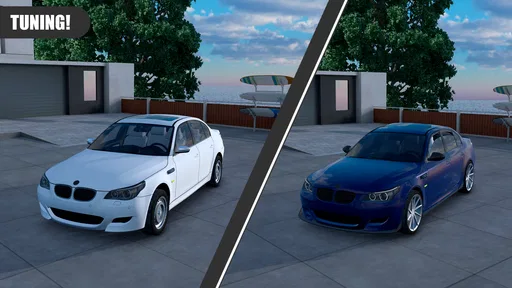
Let's talk about customization, the heart of this game. You get to build your dream car from scratch. The level of detail is impressive; everything from the engine type to the paint job is customizable. I spent a good chunk of time tweaking my car, making sure it not only performed well but also looked sleek on the track. The app offers a vast array of options, ensuring that no two cars are alike.
But it’s not just about aesthetics. Each customization impacts your car’s performance, adding a layer of strategy to the game. Do you go for speed or control? The choice is yours, and it makes every race unique.
Racing Dynamics and Gameplay
Once you’ve crafted your perfect ride, it’s time to hit the tracks. The controls are intuitive, with options for both tilt and touch steering. Personally, I found the tilt steering added a more immersive experience, but the touch controls are equally responsive for those who prefer them.
The races are thrilling, with a variety of tracks that challenge your skills. What I love most is the unpredictability. Weather conditions, track layouts, and even other racers’ strategies keep you on your toes. It’s not just about speed; it’s about smart racing.
Community and Competition
If you’re competitive like me, the online multiplayer mode is where the game truly shines. Joining races against players from around the world adds a social element that’s both exciting and addictive. You can join clubs, participate in tournaments, and even challenge friends for bragging rights.
The community aspect is well-integrated, with chat features and leaderboards that keep you connected and motivated. It’s like being part of a global racing club, and it definitely keeps the adrenaline pumping.
Graphics and Soundtrack
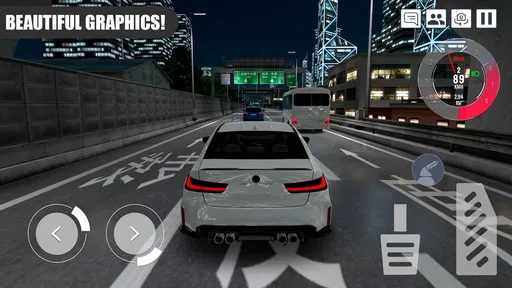
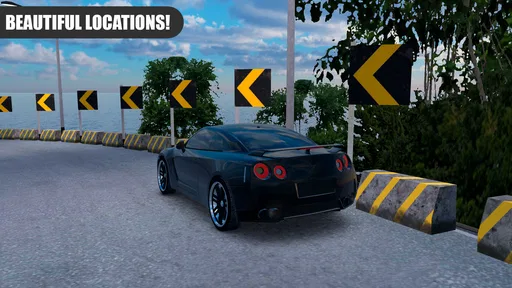
Visually, the game is a treat. The 3D graphics are stunning, bringing the tracks and cars to life with vibrant colors and intricate details. Whether you’re racing through a bustling city or a serene countryside, the visuals add to the overall experience.
The soundtrack is another highlight. Upbeat and energetic, it perfectly complements the high-speed action and keeps you engaged from start to finish.
Final Lap: My Verdict
So, is Custom Club: Online Racing 3D worth downloading? Absolutely. It offers a well-rounded racing experience that’s both fun and challenging. The customization options, dynamic gameplay, and community features make it a standout in the racing genre.
Whether you’re in it for the thrill of the race or the joy of building the ultimate car, this app has something for everyone. So, go ahead and give it a spin. Who knows? You might just become the next racing legend!
How it fits into the wider racing category
Custom Club is a free racing game from GamesEZ, released on November 6, 2023, and its continued appeal is reflected in an average rating of 4.5 from around 27,000 ratings. It has been installed over 10 million times, which suggests plenty of players have tried it, though popularity alone cannot tell you whether its particular balance of customization and competition suits your taste. The current version is 5.4.1, and it requires Android 8.0 or later.
Its Everyone age rating makes it broadly suitable from a content-rating standpoint, but that should not be confused with a promise that every control style or busy racing session will suit every person. In practical terms, I’d think about the player’s comfort with fast visual action and online interaction, not just the age label. That distinction is useful if you’re choosing a game for a family device or recommending it to someone who is new to touchscreen racing.
There are optional in-app purchases, with items priced from $0.99 to $15.99. I’d go in with a simple rule: enjoy the driving and customization first, and only consider spending if you know what you want from an item. For a free-to-start game, that makes it easier to judge whether the core experience is enjoyable on its own rather than letting purchases become part of the first impression. Anyone who prefers to avoid optional spending altogether should keep that possibility in mind before settling in.
Questions worth settling before you install
If you’re wondering whether it works for a complete beginner, the short onboarding described in the game makes a quick start approachable, but racing still takes practice. I would expect a new player to benefit from trying the steering methods and learning the menus before jumping into the most competitive sessions. It is friendly enough to explore, but that does not mean every race will feel easy immediately.
If you’re deciding whether to play with friends, its clubs, chat, challenges, and online races give it a clear social angle. That is a meaningful reason to choose it over a solo-focused racer, provided the people you want to play with also enjoy a competitive driving game. If you mainly want an offline-feeling pastime, the online emphasis may not be the feature that keeps you coming back.
If your main concern is whether it is comfortable on your device, I’d start with touch steering and a stationary playing position, then try tilt only if moving the phone feels natural. This is a practical way to reduce avoidable discomfort without assuming that one control method is universally better. The same principle applies to sound and visual intensity: choose a setting where you can focus, and stop if the pace becomes tiring.
An inclusive closing thought
Overall, I see this as a promising choice for players who want their racing game to include both car decisions and a community to race with. Its strongest points are the combination of customization, two steering approaches, and online competition; its main trade-off is that these attractions ask for attention, experimentation, and comfort with fast action. Choose it for personal car-building and social racing, not simply because you want the least demanding way to pass a few minutes.
For me, the best way to approach it is to begin with a short, low-pressure session, find the steering that feels manageable, and explore customization at your own pace. If that process is enjoyable, the online club side gives you a reason to stay. If it feels like too much input or competition, a simpler racing game is likely to be a happier fit. That’s a fair distinction, and it makes this game easier to recommend to the right person rather than to everyone indiscriminately.
Pros
- Realistic graphics enhance gameplay.
- Extensive car customization options.
- Smooth online multiplayer experience.
- Variety of challenging tracks available.
- Regular updates with new features.
Cons
- High battery consumption during play.
- Occasional lag in multiplayer mode.
- In-app purchases can be pricey.
- Requires constant internet connection.
- Limited offline gameplay options.
FAQs for Custom Club: Online Racing 3D
What are the main features of Custom Club: Online Racing 3D?
Custom Club: Online Racing 3D offers a thrilling racing experience with customizable cars, online multiplayer modes, and stunning 3D graphics. Players can personalize their vehicles with a variety of parts, paint jobs, and decals. The game also includes daily challenges, leaderboards, and various tracks to keep gameplay engaging.
Is Custom Club: Online Racing 3D free to play?
Yes, the game is free to download and play. However, it offers in-app purchases for players who want to enhance their experience with additional features, faster upgrades, or exclusive content. While these purchases can enhance gameplay, they are not necessary to enjoy the full game experience.
What are the system requirements for Custom Club: Online Racing 3D?
Custom Club: Online Racing 3D requires Android 5.0 or later and iOS 11.0 or later. The game is optimized for devices with at least 2GB of RAM and a quad-core processor for smooth performance. Ensure you have enough storage space for additional updates and downloaded content.
Can I play Custom Club: Online Racing 3D offline?
While Custom Club: Online Racing 3D emphasizes online multiplayer modes, it does offer some offline gameplay options. Players can enjoy solo races and practice tracks without an internet connection. However, to participate in online competitions and access certain features, an internet connection is required.
How do I customize cars in Custom Club: Online Racing 3D?
Customizing cars in Custom Club: Online Racing 3D is straightforward. Players can access the customization menu to choose from a variety of parts, including engines, tires, and spoilers. Paint jobs and decals can be applied to personalize the look. Upgrades can be earned through gameplay or purchased to enhance performance.


